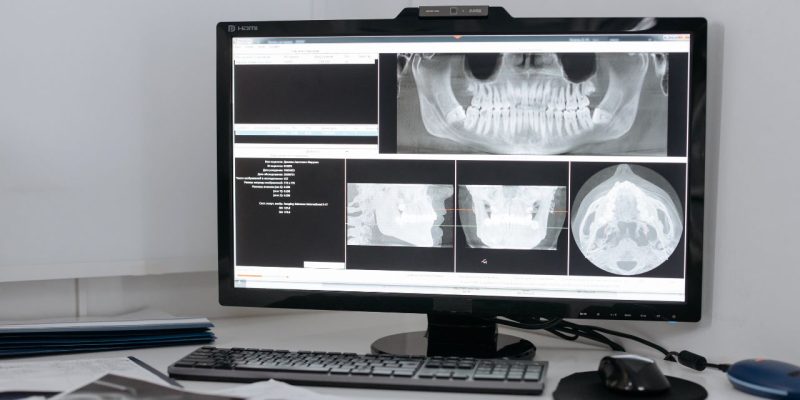
Files with the .DCM extension are DICOM (Digital Imaging and Communications in Medicine) files, a standard format used in the medical field to store and transmit images from imaging equipment (MRI, scanners, X-rays, ultrasounds, etc.). These files are not just simple images; they also contain medical metadata such as the patient’s name, examination date, image dimensions, and many other technical details.
To properly open a DCM file, you need to use an application compatible with the DICOM standard, capable of reading both the image and its associated data.
Solutions for opening a DICOM file on a computer
Computer users have several robust and specialized applications to read DCM files. These solutions not only display images but also offer full access to DICOM metadata, image processing tools, and compatibility with PACS systems. The choice of software will depend on your operating system, as well as the intended use of the file (simple viewing, diagnosis, 3D analysis, etc.).
RadiAnt DICOM Viewer (Windows)
RadiAnt is a DICOM viewer designed for clinical environments and medical offices, known for its fast DCM file opening and ease of use. Its clean interface allows loading folders containing multiple exams (MRI, CT, X-rays, etc.) while easily navigating between different image series.
It offers professional tools: window adjustments (grayscale windowing according to the type of exam), angle and distance measurements, multi-image comparison, multiplanar visualization (MPR), and even 3D reconstruction for volumetric scanners. Files can also be exported in JPEG, TIFF, or even shared via a DICOM CD with an integrated viewer. Although the free version is time-limited, it remains sufficient for occasional or evaluation use.
Horos (macOS)
Horos is one of the references on macOS for DICOM visualization. Derived from the OsiriX project, it is open source and intended for a medical or paramedical audience needing a powerful but free solution. The application allows local opening of DCM files, navigation in complete studies, and connection to a PACS server to access network imaging databases.
Its major asset lies in its functional richness: tissue segmentation, annotations, precise measurements, analysis modules, and compatibility with third-party plugins. It is even possible to perform real-time 3D reconstructions on scanner data. It is suitable for clinicians, researchers, or medical imaging students.
MicroDicom (Windows)
MicroDicom is aimed at those looking for simple, lightweight yet functional software. It is particularly appreciated in educational settings or for non-specialized users who simply want to view a DCM file. The interface is intuitive, with direct opening of DICOM files or folders, and smooth navigation through images.
It offers essential functions: zoom, measurement, contrast, image export, reading DICOM metadata, and even extracting high-resolution images for integration into reports. It can also convert a complete DICOM study into JPEG or AVI files (in the case of dynamic images). MicroDicom does not require high resources and installs easily on any Windows PC.
Weasis (multiplatform)
Weasis is a DICOM viewer designed for hospital use, particularly within medical information systems. It runs on Windows, macOS, and Linux thanks to its Java base, and can be integrated into PACS or RIS (Radiological Information Systems) infrastructures.
It allows real-time display of exams from different patients via a server connection, while ensuring fast display of series. Its features cover all medical imaging needs: multi-modality visualization (CT, MRI, CR), image adjustments, automatic measurements, DICOM printing, data anonymization, etc. It is a robust tool used in many health centers.
3D Slicer
3D Slicer is both a viewer and a research platform for biomedical image processing. It supports DCM files but goes far beyond classic reading functions. It allows performing quantitative analyses, advanced segmentations, 3D reconstructions, and even multi-modal image fusions (CT/MRI for example).
It is widely used in academic projects, neuroscience research labs, or image-guided surgery services. Although the interface is more technical and requires some getting used to, the possibilities are almost limitless. It is also compatible with Python modules for automation and advanced analysis.
How to open this type of file on Android and iOS?
Even though they are more limited in features than their computer equivalents, some mobile tools allow opening DCM files from a smartphone or tablet, especially for quick viewing or on the go.
On Android, the “DICOM Viewer” app allows loading DCM files stored locally on the device or from a cloud service like Google Drive or Dropbox. It displays images with a satisfactory level of detail and allows navigation through multi-image studies. However, functions are limited to basic manipulations: zoom, rotation, image-by-image scrolling. It is useful in a non-professional context or for quick consultation.
On the iOS side, “OsiriX HD” offers a very advanced mobile version of the reference software on Mac. Compatible with local DCM files and PACS connections, it offers more advanced tools than most mobile applications: anatomical measurements, windowing, annotations, and synchronization between multiple slices. It is designed for healthcare professionals who want to consult exams remotely or in teleconsultation. The application is paid but remains a relevant investment in a medical context.
It is important to note that most mobile tools remain limited to simple reading, without the in-depth analysis capabilities available on a PC or Mac. For diagnostic or specialized uses, it is therefore always recommended to work on a dedicated station.